
Course REGISTRATION
As a fresh undergraduate at the College of Design and Engineering, this guide will provide you with the basic tools you need to survive!
We will be going over the basics in this guide, if you have any queries, feel free to send us an email via the Contact Us section and one of our experienced seniors will get back to you!
Course
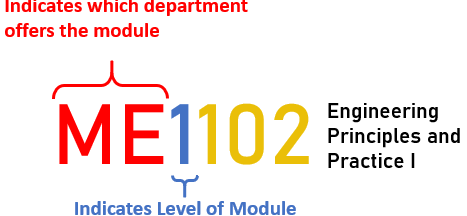
Each course of study has a unique course code consisting of a two- or three-letter prefix that generally denotes the discipline, and four digits.
The first of which indicates the level of the module (e.g., 1000 indicates a Level 1 course and 2000, a Level 2 course).The weekly workload of each course is given in the full course description.
NUSMODS is the most commonly used tool for timetable planning, but the official module descriptions and requirements are available in EduRec.
Modular Credits
A modular credit (MC) is a unit of the effort, stated in terms of time, expected of a typical student in managing his/her workload. One MC is roughly equivalent to 2.5 hours of study and preparation per week.
Thus, a typical 4-MC module would require 10 hours of work a week, including lectures, tutorials, laboratory sessions, assignments, and independent or group study.
Knowing Your Degree Requirements
1. View your degree requirements in the NUS Bulletin or your department websites
2. View your Advanced Placement Credits (if applicable)
3. Check your department recommended schedule / study plan (refer to links on the side)
4. Check if you require bridging courses in Math, Physics or English
5. Work out your requirements if you are enrolled in special programmes e.g. E Scholars
Programme, iDP , DDP , USP , UTCP , RVRC.
6. Make sure your Academic Plan in MyEduRec is updated each semester
Academic Workload
The typical workload for each semester is 20 Units (usually the equivalent of 5 courses). Below is the minimum and maximum workload applicable to CDE undergraduate students:
Minimum Workload
-
18 Units for full-time students. For more information, click HERE
Maximum Workload
-
23 Units in CourseReg Round 1 and 2
-
23 Units in Round 3, for Year 1 students in first semester
-
27 Units in Round 3, for Year 1 students in first semester under special programmes (Double Degree Programmes, University Scholars Programme, NUS College, Engineering Scholars Programme etc)
-
For all other students, the maximum workload in Round 3 is as configured by the home Faculty.
Grade points
Students receive letter grades for each module taken, except for the cases listed below.
Each grade corresponds to a grade point as shown here:

Cumulative Average Point (CAP)
Academic progress is tracked by the CAP, which is the weighted average grade point of all modules taken by a student. Therefore, a student's CAP is the sum of the module grade points multiplied by the number of MCs for the corresponding module, divided by the total number of MCs. This is represented as follows:

What is S/U?
S/U is Satisfactory/ Unsatisfactory option. For simplicity sake, it is to allow a module to change its alphabetical grading system to a pass/fail system. To ‘pass’ that certain module using the S/U option, you will need to get a C grade or above. This is usually done to increase your Cumulative Average Point (CAP). If you are to get a U, your module will not be considered completed so you may have to retake that module or choose another module in replacement of that.
All Year 1 students receive an S/U allowance (typically 20 MCs or more depending on cohort policy). Please check the latest cohort-specific S/U rules via NUS.
General Education Modules
The 6 pillars that form General Education are
-
Cultures and Connections (GEC)
-
Critique and Expression (GEX) : Replaced by ES2631
-
Digital Literacy (GEI) : Replaced by CS1010E for most CDE Students
-
Singapore Studies (GESS)
Each General Education Module (GEM) carries 4 Modular Credits (MCs). To satisfy the University Level Requirements for General Education, students are required to read one GEM from each pillar (Total: 24 MCs). Some CDE CC modules may satisfy GE requirements — check your degree map or CDE Advising page.
For more information, you can read more here.
Module Registration Schedule
For every academic semester, you would have to plan and register for the modules you would like to take this semester.
Reminder emails should have been sent to your NUS Emails and available online here.
Academic Plan Declaration
The Academic Plan(s), which can be a Major/Second Major/Minor/Specialisation/Track, has impact on the curricular priority given to students for their module choices during the ModReg exercise. Hence, it is important for students to verify that their Academic Plan(s) is/are accurately reflected in their record at the Education Records System (myEduRec) every semester.
To ensure that students are assigned the appropriate curricular priority for their module choices in ModReg, students are strongly advised to complete their Academic Plan Declaration (if applicable) 24 hours before participating in the ModReg exercise.
The user guide for the Academic Plan Application/Declaration function in EduRec can be found here
Appeals outcomes are usually released within 1–3 days depending on round..
Any Questions?
-
System issues - go through the CourseReg Videos first
-
Course-specific issues - check out the Common Appeals for common courses
-
If you still need help, submit your appeal in CourseReg (Tip: look up the appeal timelines and appeal types first!)
-
For other appeals or enquiries, contact the respective NUS office for assistance